The problem
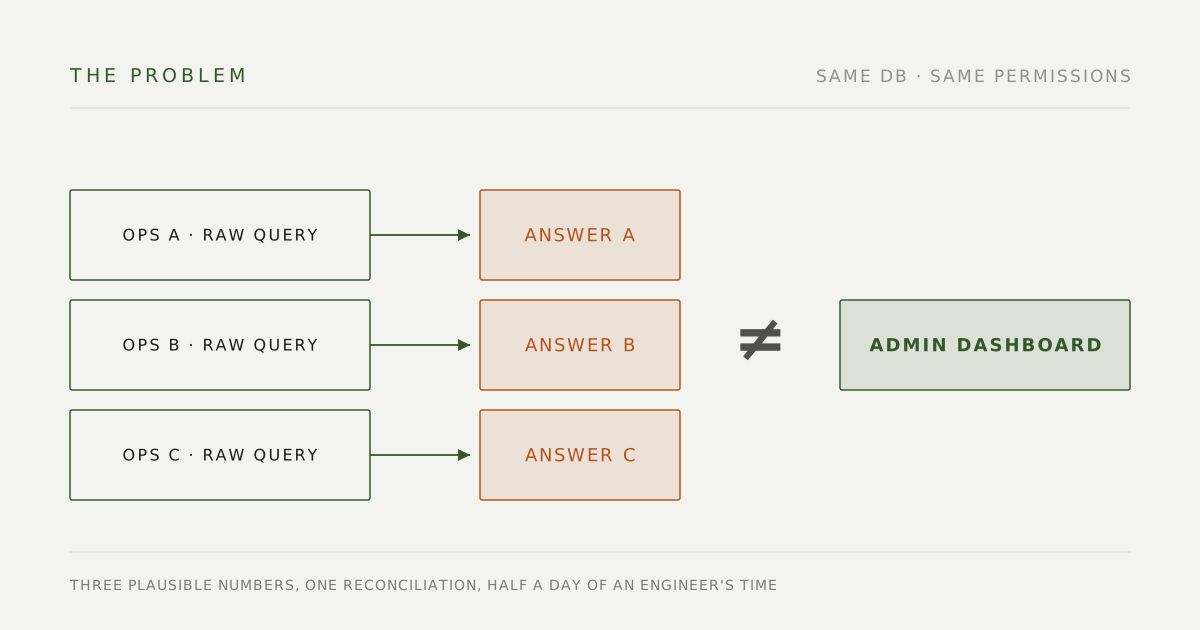
This project didn’t start with a bug. It started with a scene that played out every single day: an ops teammate hits a question, and their first move is to post it in the engineering channel. What happened to this order, what’s the rule here, can someone pull this data — every one of those pulls an engineer out of whatever they were building. The goal of this project, start to finish, is one sentence: let ops ask their AI and get the answers they used to have to ask an engineer for.
The awkward part: on paper, every tool already existed.
- The knowledge bot had been live for half a year and could answer anything the docs covered. But docs go stale and retrieval fumbles conversational phrasing — after a few failed searches, ops simply stopped relying on it.
- The CEO had already given ops read-only database access, and they all use Claude Code. So they went with raw queries.
Here’s what raw querying costs. “What was revenue this month?” sounds like one SQL statement. In our system it isn’t: the amount has to come from OrderDetailMainView rather than Orders.TotalPrice, it groups by product line, the order date is CreateTime and not OrdersTime (that’s the subscription renewal date), and charity donation orders have to be excluded. Get any one of those wrong and the number is wrong — wrong in a way that looks right, because it still returns a perfectly plausible figure. It really happened: ops-computed revenue wouldn’t reconcile with the dashboard, and an engineer lost half a day to the reconciliation.
When I laid it all out, exactly one puzzle piece was missing: code. Ops teammates’ AI couldn’t read the codebase, so “how does this rule actually work right now” came down to docs (possibly stale) or guessing. Give the AI code access, and it can check what the knowledge base says against what the code actually does before answering — and even circle back and fix the stale doc.
AI doesn’t lack the ability to write SQL. It lacks this company’s common sense. This project turns that common sense into infrastructure.
Start with the users: what they had, what was missing
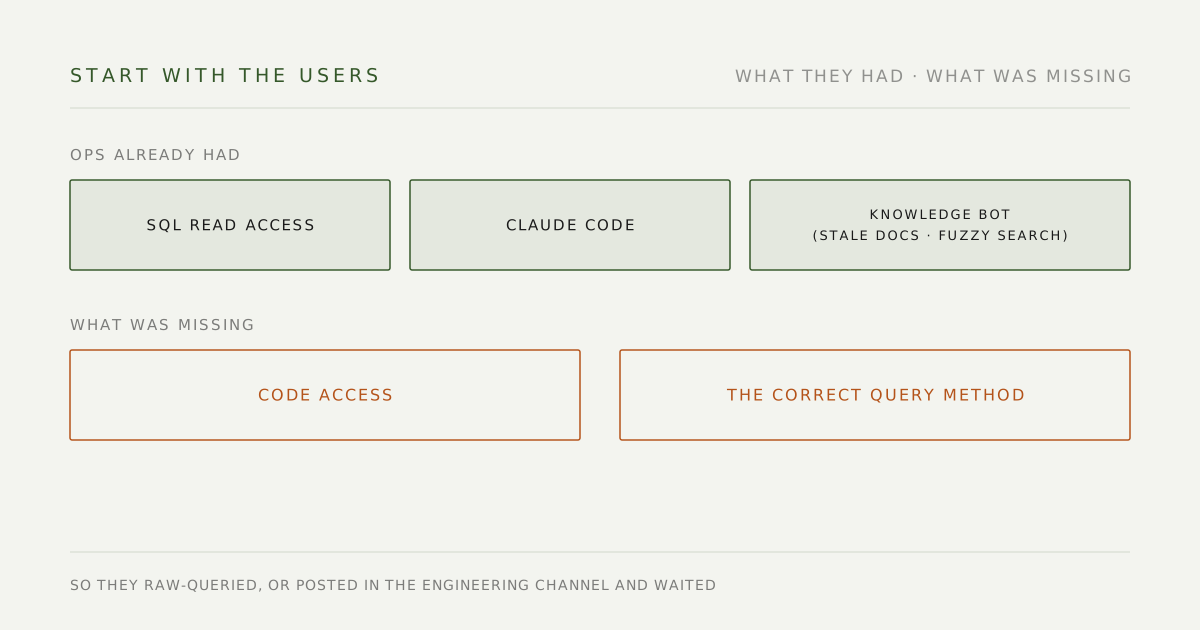
Before building anything I did what a UX process would do — inventory not the features, but how each kind of person gets through their day:
| User | Already had | Missing | So they… |
|---|---|---|---|
| Ops | SQL read access, Claude Code, the knowledge bot | The correct query method, code access | Raw-queried wrong, or queued for an engineer |
| Customer service | The knowledge bot | Fresh documents | Fell back to asking a person |
| Engineers | Everything | Time | Got interrupted several times a day |
Nobody lacked permissions or tools. What was missing was a trustworthy path connecting the abilities that already existed. This was never a “build a new feature” project — it was a wiring project. That realization shaped every design decision after it.
The first fork: extend the knowledge bot, or build new?
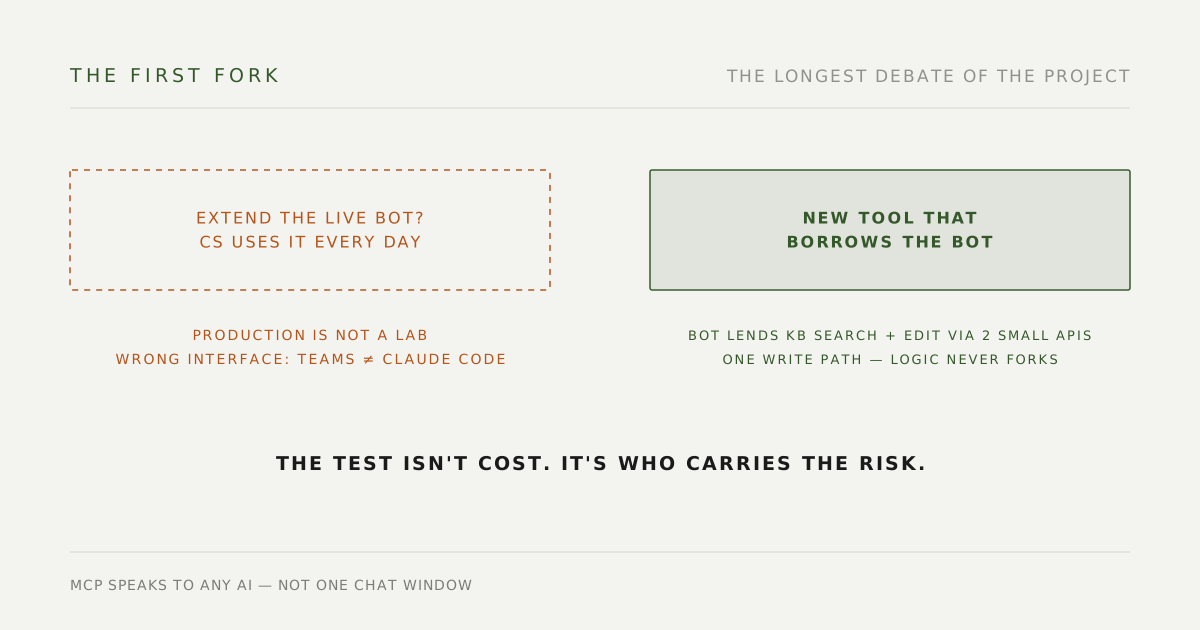
This was the longest debate of the project’s early phase. The intuitive route was to bolt the new abilities onto the knowledge bot — the users already exist, the interface is already there, it looks cheapest. I chose to build new, for three reasons:
- A production service is not a laboratory. The bot is what customer service uses live, mid-phone-call, every day. Hanging brand-new capabilities — database queries, code search — off of it means gambling its stability on every iteration. The judgment got validated later: the one deploy that touched it to share capabilities caused two brief outages (root cause was the deploy method, but the point stands — a production service can’t absorb that kind of bet).
- Pick the wrong interface and the whole product is wrong. The bot lives in Teams, built for ask-one-answer-one. But the target users’ actual working surface was already Claude Code — they didn’t want another place to type, they wanted the AI already in their hands to get stronger. MCP is an interface for AIs: wire it up once, and ops’ Claude, engineering’s Claude, and whatever AI comes next can all use it. Nothing is married to one chat window.
- Abilities can be borrowed without moving house. I didn’t copy the bot’s retrieval or write logic. Instead the bot exposes two small internal APIs, and the new tool’s knowledge-base search and document edits borrow its abilities. The company has exactly one document-write path, forever — it can’t fork and drift. (There was a practical factor too: the bot is Node, the new tool is Python; jamming them together would make both harder to maintain.)
“Extend or rebuild” isn’t decided by cost. It’s decided by who carries the risk.
The idea
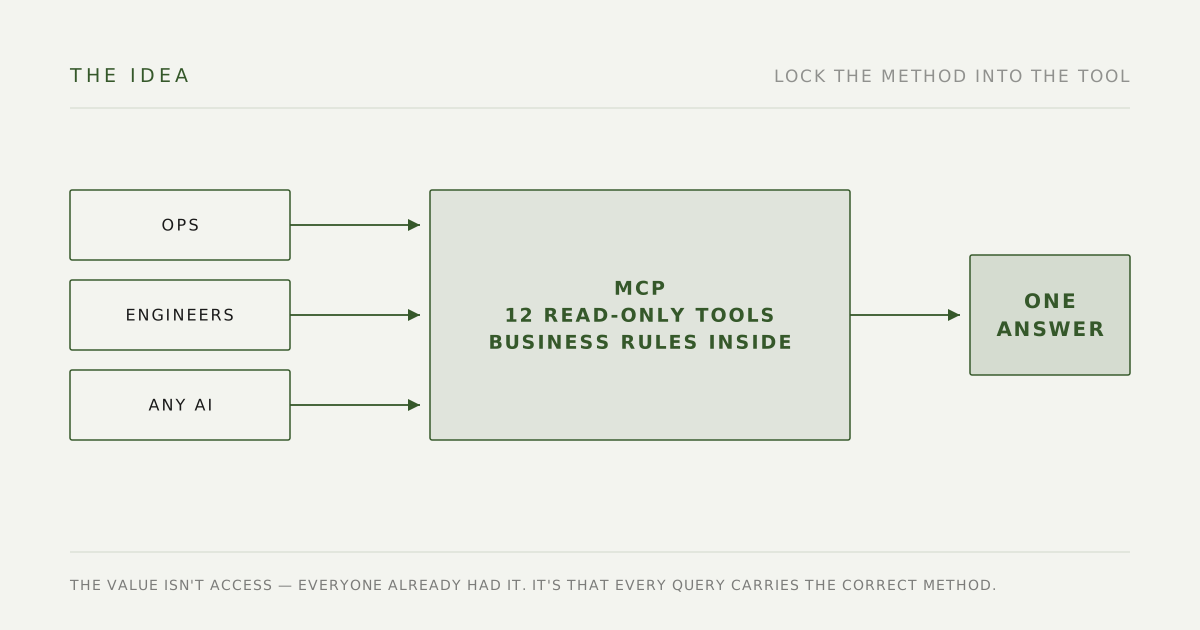
Build a read-only MCP that encodes the business logic as tools.
The value isn’t database access — that already existed. The value is that every query carries the correct method with it. Lock the revenue calculation into a tool, and everyone asking the same question gets the same number.
The plan was one core, two exits: the same toolset serves ops self-service in Claude Code first (Phase 1, build the habit), then powers automated triage for engineering (Phase 2 — an error report comes in, a bot runs the same tools and produces a handover document). Harden the core once; both sides benefit.
Where the 12 tools came from
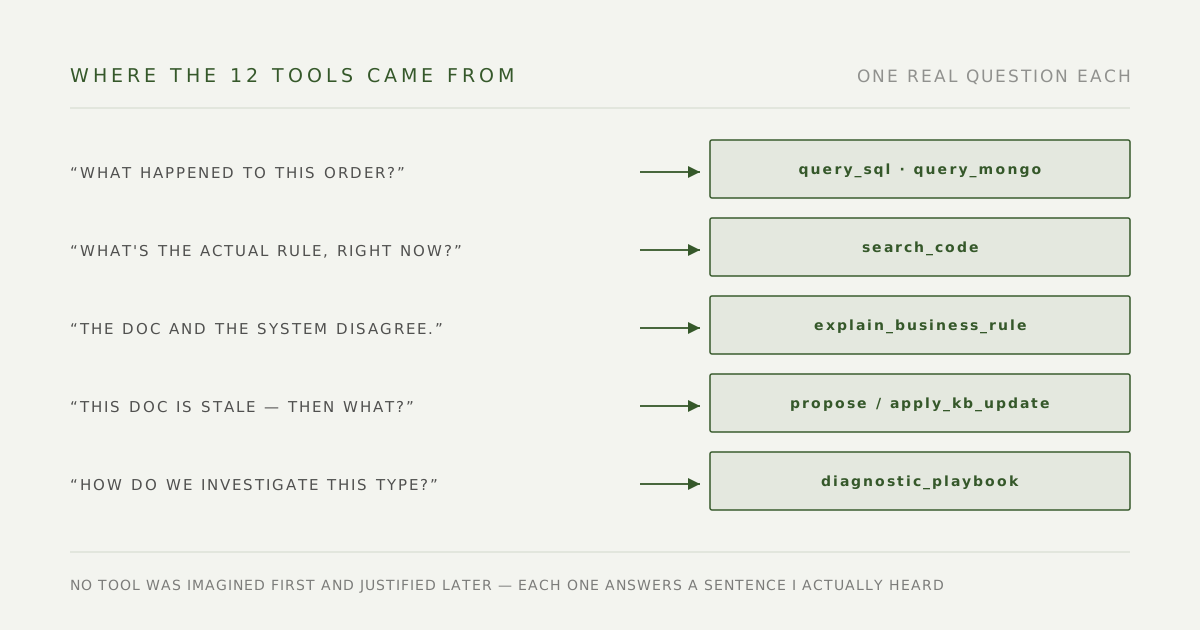
No tool was imagined first and justified later — each one answers a sentence I actually heard.
“What happened to this order?” The old flow: paste the order number in the engineering channel and wait. Now: query_sql + query_mongo. The design hill I chose to die on was including Mongo: the invoice’s actual issuance result, whether the customer reached the confirmation page, the checkout snapshot that reconstructs a lost order — those truths don’t exist in SQL. Wire up SQL alone and a whole class of questions stays permanently unanswerable.
“How does this rule actually work, right now?” The old flow: check a doc (possibly stale) or ask a senior colleague (possibly misremembering). Now: search_code, grepping the remote default branches of six repos. The rationale in one sentence: code is the only documentation that can’t go stale.
“The doc and the system disagree — who do I trust?” This is the root of why the knowledge bot lost people’s trust: retrieval wobbles, docs age, and one bad answer costs all future credibility. explain_business_rule is the head-on fix — grep the code and semantically search the docs at the same time, return both side by side, and let the AI reconcile them. The code is deterministic; it props up the confidence of the entire answer.
“Okay, the doc really is stale — then what?” The old flow: make a mental note, fix it someday (i.e., never). Now: propose_kb_update / apply_kb_update — draft the correction right at the moment of the query, publish after a human confirms. That turns knowledge freshness from somebody’s todo item into a side effect of querying — a direct treatment for the exact staleness that had crippled the bot.
“We re-derive the same investigation every time.” → diagnostic_playbook: the standard method for each problem class, written down as readable SOPs.
“Ops writes a requirement, and engineering still has to interrogate them line by line.” → draft_requirement_guide: at writing time, it finds existing code integration points, similar past requirements to use as templates, and the completeness questions that must be answered.
Four architecture decisions, made before the first line of code
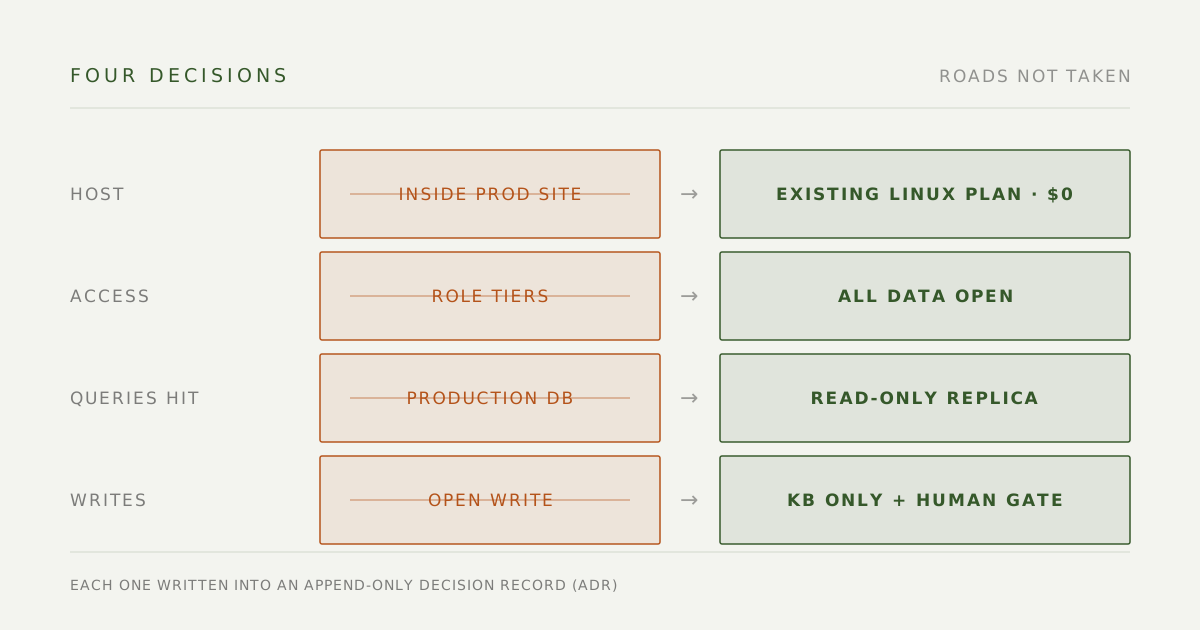
Each of these had an easier path I deliberately didn’t take. I’m writing the trade-offs down the way they actually happened — they all went into append-only decision records (ADRs), so whoever inherits this can see why it was built this way.
Decision 1: where it lives. Three options: a /mcp route inside the main storefront app (an engineer’s suggestion — least work), squeezing into the existing Windows test plan, or reusing another Linux plan we already paid for. I rejected the first two: search_code clones six repos onto the server and runs git grep across them, and that class of workload should never get the chance to lean on the production storefront; the Windows plan doesn’t run Python, already hosts nine apps, and had previously crashed a service under resource contention. It landed on the existing Linux B1 plan at zero additional cost.
Decision 2: the permission model. All data open; no role tiers. Both ops and engineers can query the full SQL and Mongo estate. The reasoning is pragmatic: the CEO had already granted ops read access, so if the MCP restricts more than the status quo, people just go back to raw queries — the exact behavior I was trying to end. Restricting people doesn’t make numbers accurate.
Decision 3: what queries hit. query_sql targets a read-only replica, never production. This is blast-radius thinking: assume the worst case will happen — someone fires off a pile of heavy queries at once — then ask how far the damage spreads. Against a replica, the answer is “the replica gets slow” and checkout never notices. Against production, I’d rather not find out.
Decision 4: the write boundary. Production code, databases, and cloud resources are permanently read-only. The single write path is the knowledge base, and a human confirms before anything lands. A read-only tool that gets tricked returns wrong text; a tool that can write is a different conversation entirely.
If you keep one thing from this section: the point of an architecture decision isn’t what you chose — it’s writing down what you didn’t choose, and why. Each of these four has already cut short one “wait, why didn’t we just…” re-litigation.
How the work splits between me and AI
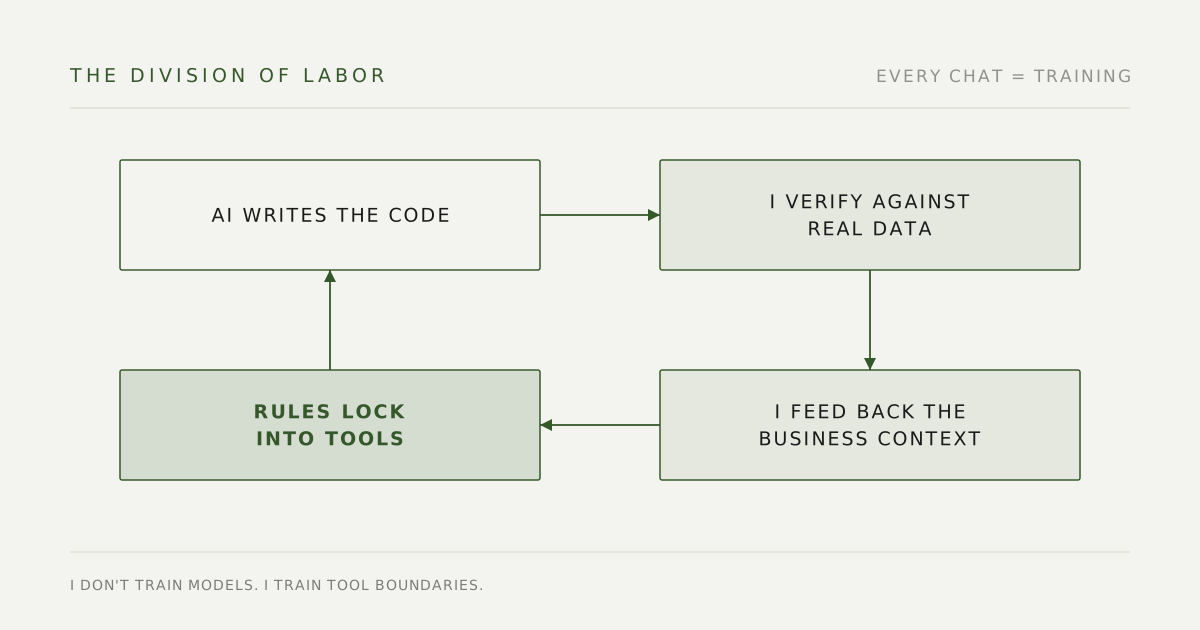
The code is almost entirely AI-written — I’m not going to dance around that. But everything this tool knows, I taught it. My job isn’t typing; it’s feeding AI the real business context that the code and the data actually map to, so what it produces is grounded in the right logic the first time.
Three concrete examples.
Teaching it how revenue works. “Order date means CreateTime, not OrdersTime” is not knowledge an AI can guess, and no column comment will volunteer it — it’s a scar from a reconciliation that wouldn’t balance until someone chased it down. That kind of lesson used to live in my head and my chat history, re-taught in every fresh conversation. Now it’s locked into the tool layer, where everyone — including every AI — gets it right automatically.
Calibrating it with real examples. For draft_requirement_guide, I didn’t let AI invent a template from thin air. I fed it real cases from our requirements backlog — four that were written well, three that engineering bounced, four that were unusually complex — and together we distilled the pattern: the five-section template is just a skeleton, but four things are non-negotiable — scope, states, exceptions, and definitions of measure. Every bounced requirement had died on one of those four, and had only been rescued by a PM interrogating the author after the fact. This tool moves that interrogation forward, to the moment the requirement is being written.
Accepting what’s non-deterministic, and compensating in architecture. Knowledge-base retrieval has an honest limitation: query expansion is done by an LLM, so the same question ranks differently on different runs. My call was to stop tuning retrieval toward perfection — that road has no end — and lean on the composite design of explain_business_rule instead: let deterministic code shore up wobbly retrieval. Asked why a certain product can’t be merged into a combined order, it hit MergeOrdersService.cs:151 in code and ranked the right requirements doc first. When both agree, the answer earns its confidence.
I don’t train models. I train tool boundaries. Models get swapped, conversations end; business logic written into the tool layer stays.
Putting knowledge at the right layer
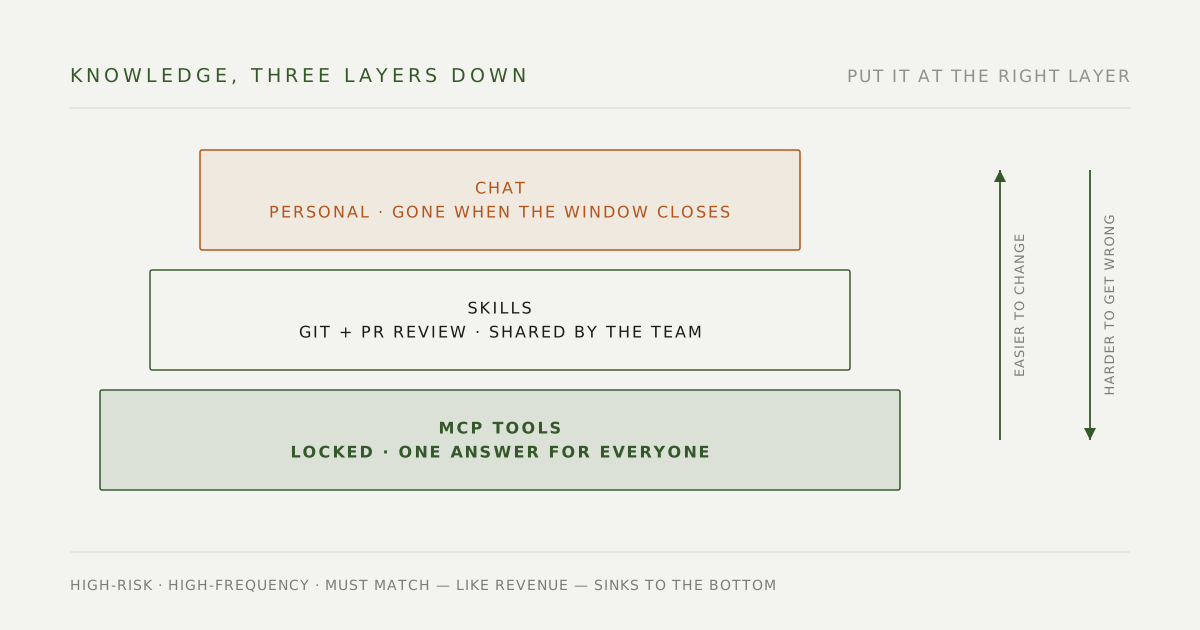
I started with the query logic hard-coded. Then I changed the rule: knowledge that changes lives in markdown; only stable capability lives in code.
diagnostic_playbook came out of that. Each class of problem gets its own .md file describing how to investigate it; the tool just lists them or returns one in full. Adding a new playbook means dropping in a file — no code change, no redeploy.
This is one piece of a company-wide AI governance layer: know-how from personal AI conversations first gets distilled into skills under version control with a review flow (GitHub, branches and PRs, nothing straight to main). The subset that is high-risk, high-frequency, and must return one answer for everyone — like the revenue calculation — sinks one level further, into MCP tools. The trade-off across the three layers is simple: the lower you go, the more stable and harder to get wrong, but the harder to change. Put each piece at the right layer and you almost never have to re-ship.
Security design
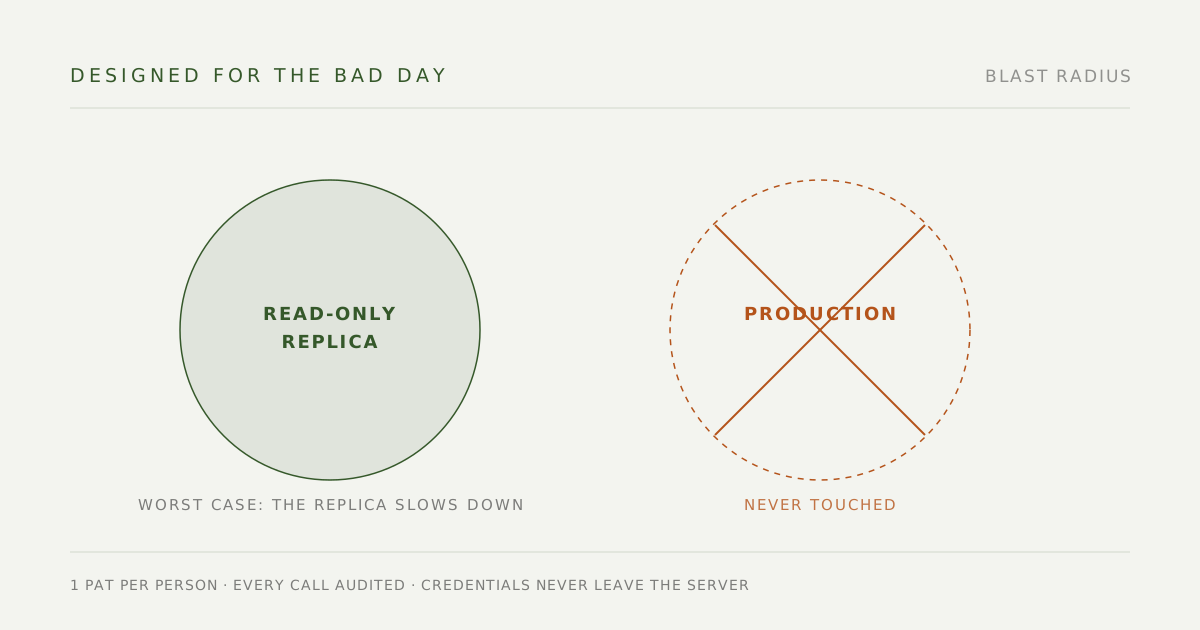
This tool puts company-wide data one question away from a dozen people, so the security layer is designed on the assumption that something will go wrong:
- One personal access token per person, no shared credentials. Auth reuses the company’s existing PAT system; revoking one person affects no one else.
- Credentials never touch anyone’s laptop. Centrally hosted; connection strings exist only server-side — the main reason I rejected per-machine installs.
- The audit log records every call: who, which tool, what they asked, how long it took, how much came back. Not to police people — so incidents are traceable, and so I can see what people actually ask, which is the only honest input for deciding what to build next.
- Even the auth had to be verified. After wiring up PAT validation I found a trap: paste the old shared secret and the request still returns 200, looking exactly like PAT works. The tell I settled on: watch whether the health endpoint’s cached-principal count ticks up — only requests that genuinely pass PAT validation enter the cache. “The request succeeded” and “it took the path you think it took” are two different claims.
The last mile I underestimated: installation
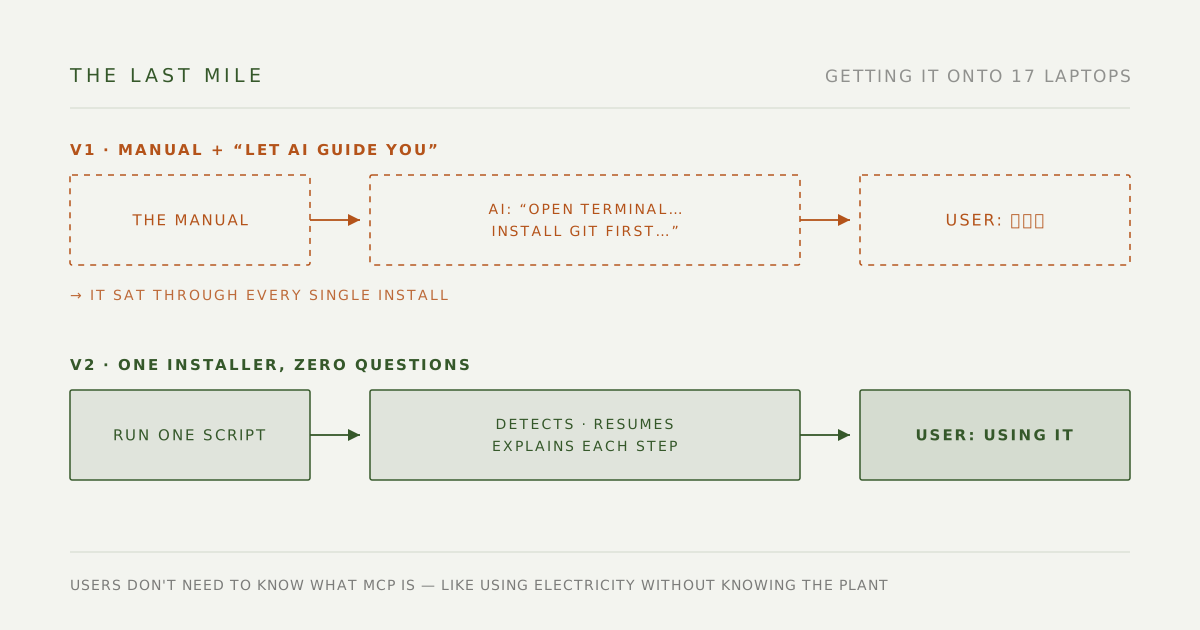
Once the tool was built, I thought the hard part was over. Wrong — the hard part was getting it onto the laptops of a dozen people who had never opened a terminal in their lives.
Version 1: a manual, plus “let your AI walk you through it.” It sounds reasonable: write the manual clearly enough, have each teammate hand it to their AI, and the AI guides the install. What actually happened: most colleagues didn’t even know what an MCP was, and the AI — dutifully following the manual — would say “open your terminal,” “you’ll need to install git first,” “run this command.” Every one of those lines reads as hieroglyphics to a non-technical teammate. The first batch of installs turned into IT sitting with people one laptop at a time, for a long time.
The failure was in my assumption. I thought “manual + AI” equaled “guided.” In reality the AI just translated the manual into a sequence of instructions the user couldn’t perform.
To someone who has never used a terminal, “open your terminal” is the same as no instruction at all. The barrier isn’t the user’s problem. It’s the designer’s.
Version 2: an installer package — zero-thought install. I pulled everything the AI used to ask users to do into one install script: environment detection stopped being an AI guessing game — the script itself determines how far this machine got and fills in whatever’s missing; anyone stuck halfway just re-runs it and it resumes from the break point instead of breaking. What’s left for the user shrank to almost nothing: self-issue a token from the admin panel (no waiting on IT), run the installer, start querying.
One more layer on top: a “set up company tools” skill. A teammate tells their own AI “install the company tools for me,” and the skill shifts the AI’s behavior to doing the work itself and narrating each step in plain language — instead of quizzing the user. Health checks and reinstalls run through the same entrance.
The payoff shows up in the numbers one section down: on company-wide launch day, a colleague nobody had ever hand-held completed the install alone and started querying the same day. Adoption is designed, not announced.
How it’s going
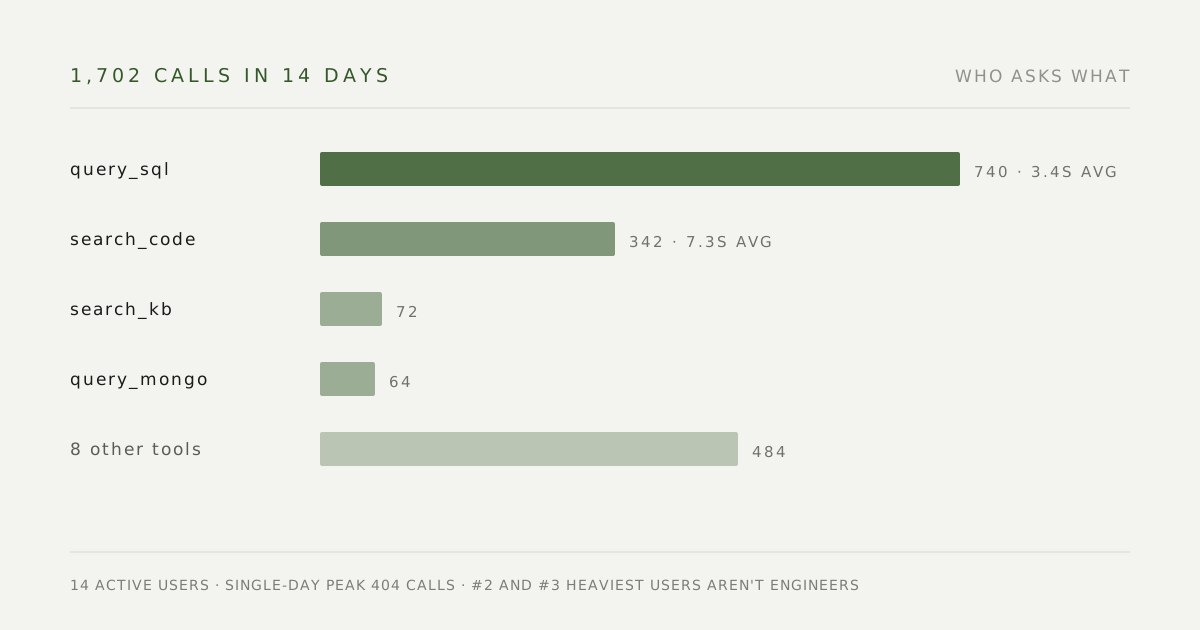
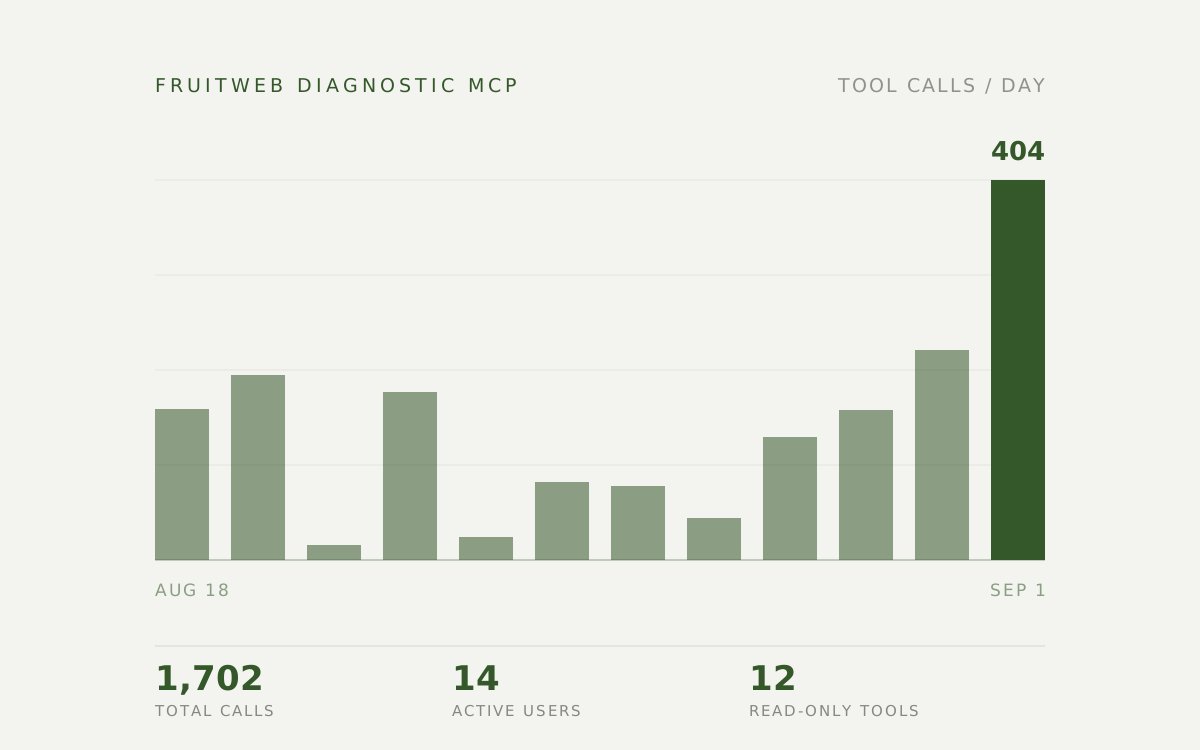
Launched 18 August; rolled out company-wide on 1 September.
As of 1 September: 1,702 tool calls, 14 teammates actively querying, 17 people onboarded. Single-day peak of 404 calls. query_sql leads (740 calls, 3.4s average), then search_code (342 calls, 7.3s average).
More interesting than the numbers is who’s using it: the second and third heaviest users aren’t engineers. They now look up members, orders, and product settings themselves instead of posting in the engineering channel and waiting.
What went wrong (and what it taught me)
Shipping this taught me more than building it did.
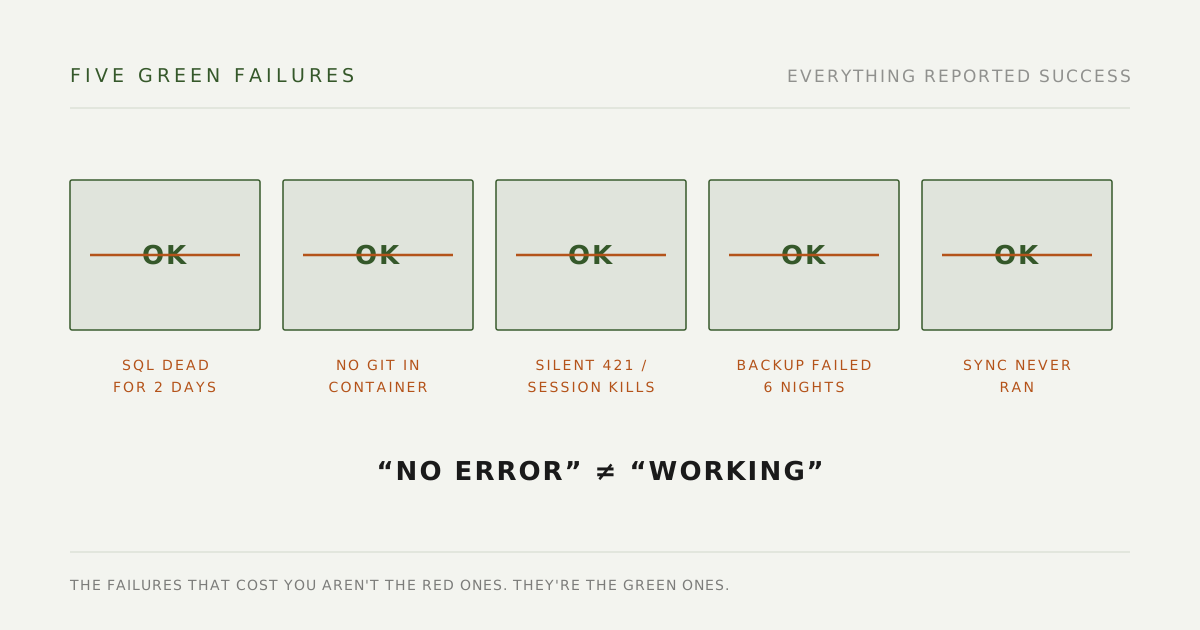
- SQL was broken for the first two days. I cached the connection globally, and the Azure gateway drops idle connections — after which every
query_sqlreturned “Not connected” forever, until the whole service restarted. It never recovered on its own. Adding reconnect-and-retry fixed it. - There’s no git in the container.
search_codelives on git grep, but the App Service container doesn’t ship with it, so the startup script installs it. I backgrounded the install, and the price is that for one to two minutes after every restart,search_codesimply errors out before healing itself. The first time, I assumed I’d broken the deploy. - Two settings are load-bearing, and neither failure mode tells you so. Without
MCP_ALLOWED_HOSTSyou get a bare 421 Invalid Host header; withoutstateless_http, any slightly long query dies mid-flight with Session terminated. - My backup job failed six nights before I noticed. Audit logs only survive three days on the server, so I scheduled a 9pm pull to my laptop — which failed six times out of eight, because the machine had just woken from sleep and DNS wasn’t up yet. Three consecutive failures means permanently lost data. Moving it to 6pm, adding five retries and a run-on-boot made it stable.
- Rollout day surfaced four things that reported success while being broken. The worst: a server sync command with the wrong arguments, meaning every update to the query playbooks since launch had silently never taken effect. The system reported success the entire time.
“No error” is not the same as “working.” The failures that cost you aren’t the red ones. They’re the green ones.
These days, whenever something “completes,” I ask the AI one more question: good — now assume it silently did nothing, and prove to me that it actually ran.
What’s next
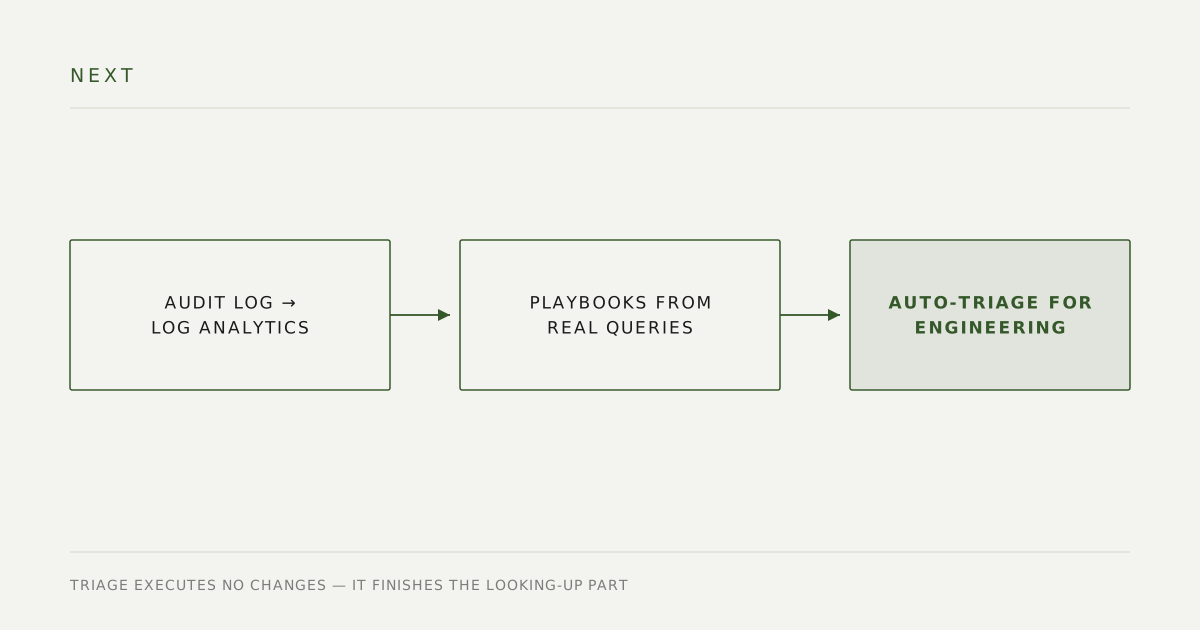
- Ship audit logs to Log Analytics. They currently only print to the container and wash out after three days — not enough for real usage analysis.
- Design tools from the query log. What people actually type is the backlog for the next set of playbooks.
- Automated triage for engineering (Phase 2): an error report comes in, the same toolset runs the investigation, and a handover document lands for an engineer to pick up. It executes no changes — it just finishes the looking-up part.
Stack
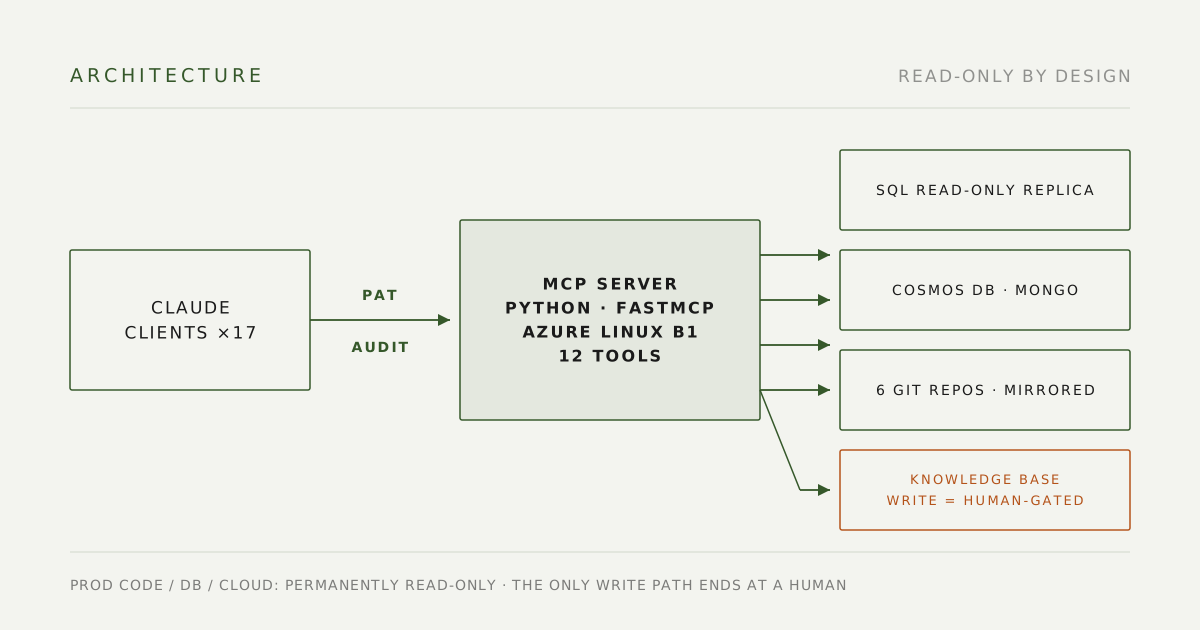
Python 3.13, FastMCP (Streamable HTTP), Azure App Service (Linux B1, reusing an existing plan at no additional cost), an Azure SQL read-only replica, Cosmos DB for MongoDB, Bitbucket (six mirrored clones on a fetch timer), knowledge base reused through the knowledge bot’s internal APIs, PAT auth with audit logging, append-only architecture decision records (ADRs).
Internal tool; source not public.